Respond to the message with an emoji — with animation.
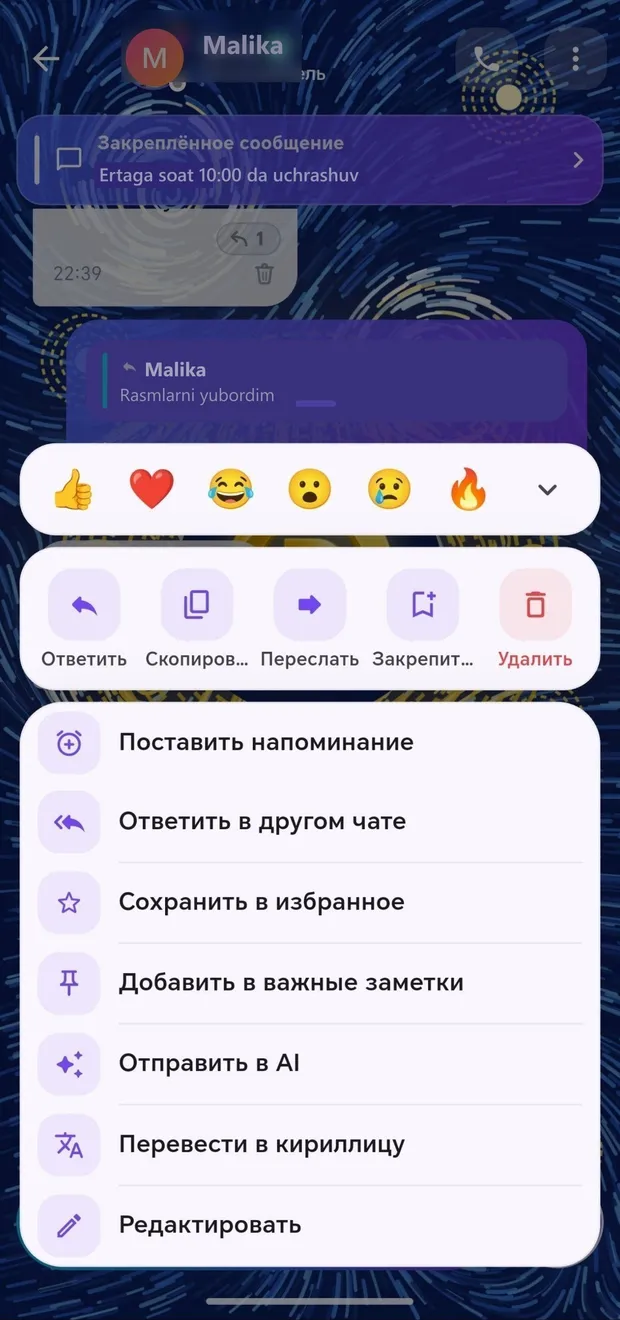
Tap or swipe the message left — the reactions and actions menu opens: reply, copy, forward, pin, set a reminder, reply in another chat, send to AI, and more. When you react, it “lands” beneath the message with a beautiful animation.
Tap the message
Choose one of the emojis above or open the full list via ↓
Perform the desired action from the menu below
Fast, beautiful, and lively messaging.
More detailsOne tap — record and send; choose the playback speed.
More detailsSend multiple photos as one beautiful album.
More detailsSend a document, PDF, map location, or contact.
More detailsShow your route in real time for a specified period.
More detailsReply to the message and quote the relevant part.
More detailsCorrect a mistake or delete the message with one tap.
More detailsAn important message always stays at the top of the chat.
More detailsForward a message to another conversation or reply there.
More details